Loading
AI Project Health in 5 Minutes: Instant Agentic Diagnostics
Stop guessing your project’s health. Learn how to use Agentic Diagnostics to identify bottlenecks, track workloads, and fix bugs in under 5 minutes with AI.

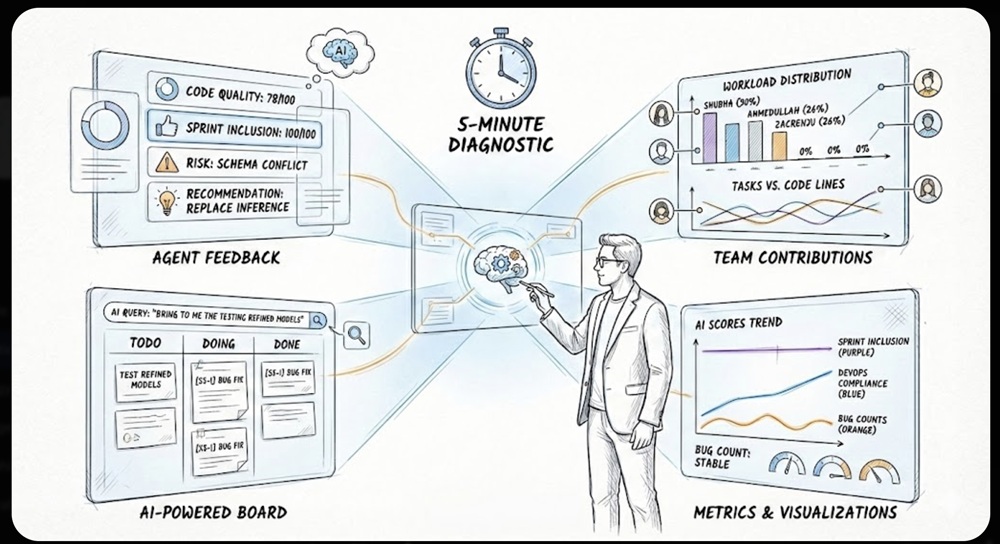
Software projects are complex systems. They involve many agents and tasks that rely on each other.
For managers, the challenge is always the same: How do you spot bottlenecks, track progress, and balance the team’s workload without spending hours just trying to understand what is happening? It can feel overwhelming to keep everything moving smoothly when there are so many moving parts to watch at once.
The solution is Instant Agentic Diagnostics. By utilizing an AI-Powered Board, analyzing Team Contributions, and reviewing Agent Feedback you can assess your project’s health in under five minutes.
1. The Board: AI-Powered Filtering
You go to the board for a centralized visual view. Instead of manually sorting through hundreds of tickets, you use AI natural language search to zoom in on exactly what matters.
How to filter effectively:
- Natural Language Queries: You don’t need complex filter buttons. Just type: “bring to me the testing of refined models”.
- Instant Context: The AI immediately isolates relevant cards (e.g., “[S5-1] Test refined models”) so you can check their status without distraction.
Insight Example: By asking the AI to filter for specific testing models, you instantly see that the task is in the “DOING” column, confirming that progress is being made on the critical path.
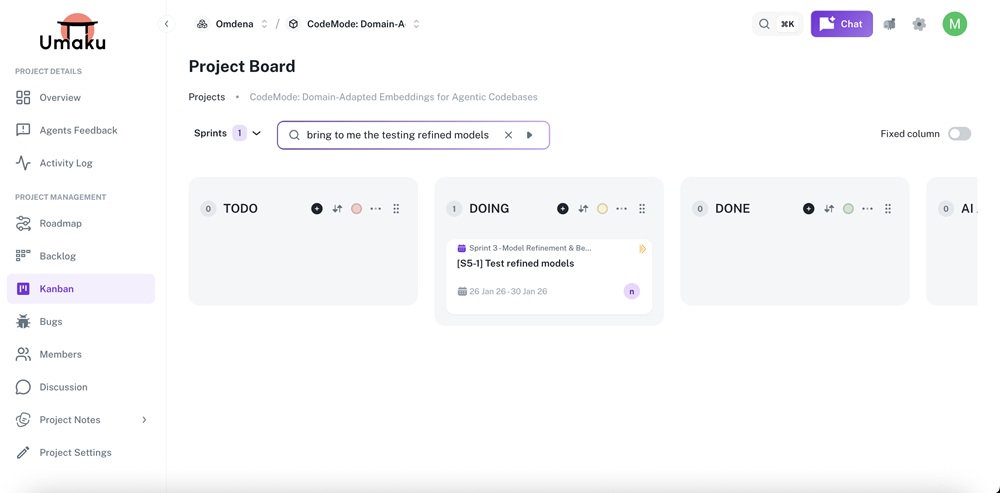
Figure 1. Project Kanban Board – Sprint Task filter
2. Team Contributions: Who is Working Faster and Better?
Once you understand general health, you drill down into the “Who.” Analyzing Team Contributions helps you identify bottlenecks and workload distribution.
Key Metrics to Track:
- Contribution Balance: Identify who is carrying the load. In the snapshot below, we can see Shubha (30%), Ahmedullah (26%), and Zacrenju (26%) are driving the progress, while others are currently at 0%.
- Tasks vs. Lines of Code: Spot if someone is working hard but stuck (high lines of code, low task completion) or if the workload is uneven.
Why this matters: Seeing that three engineers are doing nearly 80% of the work allows you to immediately redistribute upcoming tasks to the rest of the team to prevent burnout.
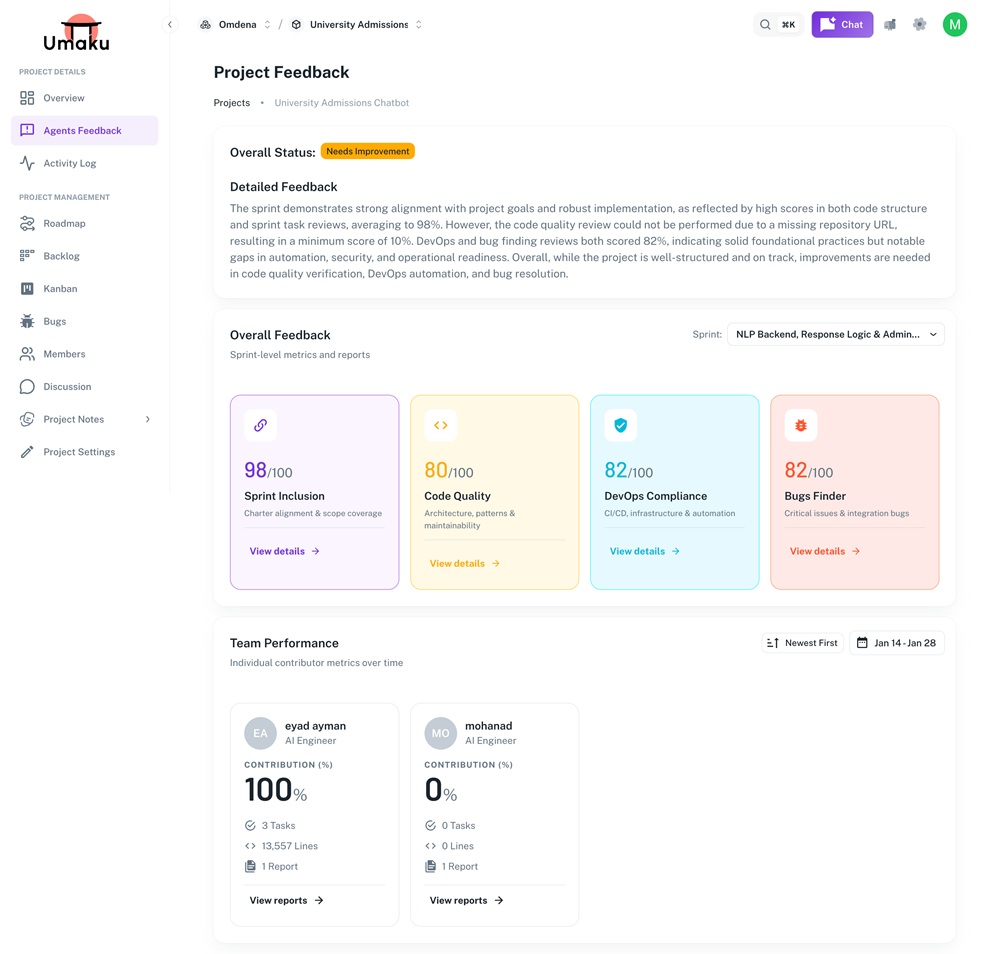
Figure 2. Project Feedback Dashboard – Sprint Evaluation Summary/Team Performance
3. Agent Feedback: Understanding Insights Quickly
The first step is to “study” the project. You don’t need to read every log; you need high-level intelligence. Agent feedback provides real-time insights into task status and blockers.
What to look for:
- High-Level Health: A quick score gives you an immediate baseline. For example, seeing a Code Quality score of 78/100 signals room for improvement, while Sprint Inclusion at 100/100 shows excellent alignment.
- Strengths vs. Improvements: Instantly see risks. In the example below, the agent flags a “Schema authority conflict,” allowing you to catch technical debt before it becomes a bug.
- Actionable Recommendations: The agent suggests exact fixes, such as “Replace filename-based schema inference,” so you can assign clear tasks immediately.
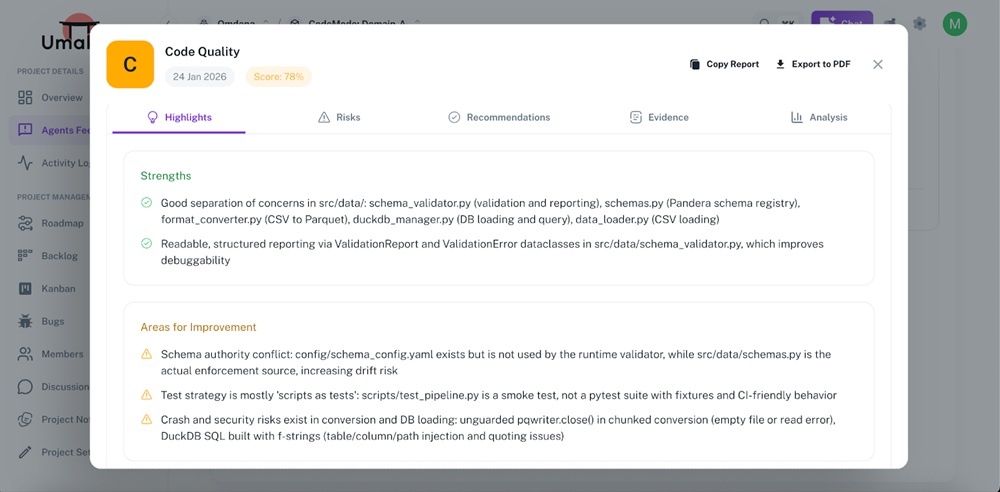
Figure 3. Code Quality Assessment – Highlights View
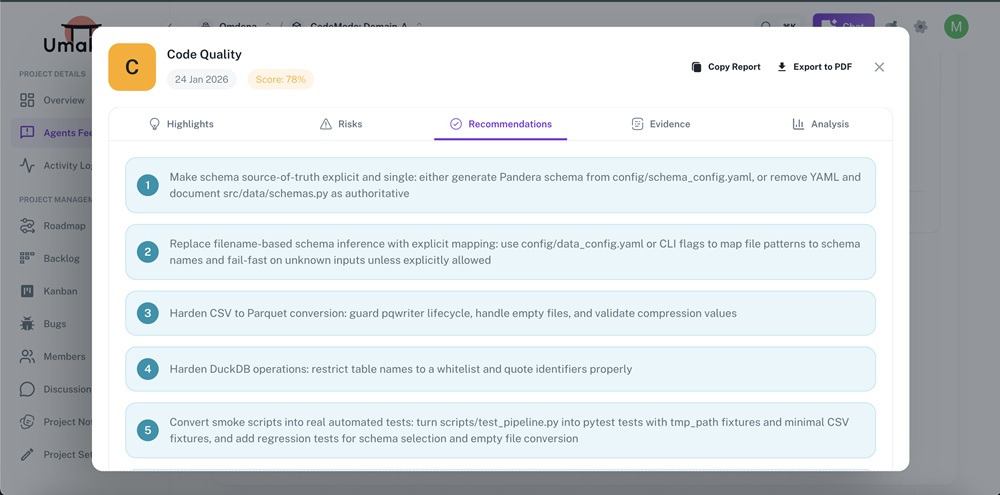
Figure 4. Code Quality Assessment – Recommendations View
Spotlight: The Bugs Finder Agent While Code Quality checks the structure, the Bugs Finder digs into reliability. In this project, the agent returned a Score of 76%, immediately flagging a moderate risk.
It didn’t just find syntax errors; it found logic gaps:
- Testing Blind Spots: The agent warned that “Integration and runner scripts are not covered well by tests,” a critical insight that prevents future crashes.
- Data Consistency: It detected that “Output schemas… are inconsistent” between synthesis and generator scripts. Catching this schema mismatch early saves hours of debugging broken data pipelines later.
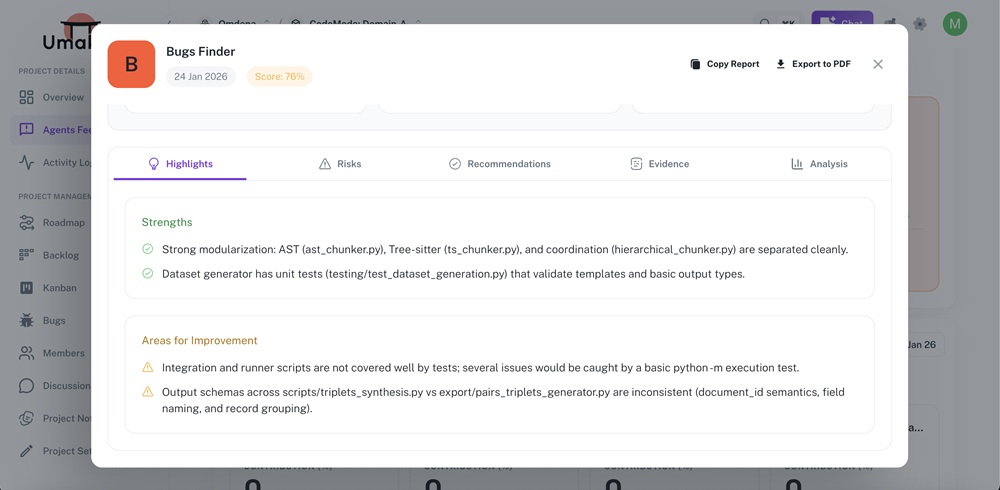
Figure 5: Bugs Finder Reliability Report
4. Metrics & Visualizations: The Big Picture
Charts and graphs make insights easier to digest and share with stakeholders. A quick glance at the trends can tell you if your project is improving or degrading over time.
Key Trends to Watch:
- Sprint Inclusion: Is the team delivering what was promised?
- DevOps Compliance : Are standards slipping as speed increases? In the graph below, we see a healthy upward trend in compliance.
- Bugs Finder : Is the bug count stable?
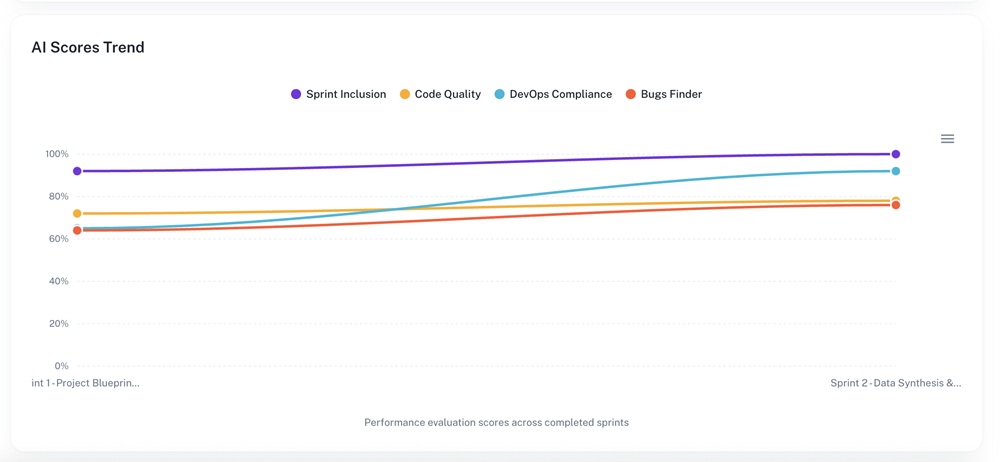
Figure 6. AI Scores Trend Across Project Sprints
Summary: The 5-Minute Workflow
You can complete this full diagnostic loop in under five minutes:
| Step | Time | Action | Output |
| Agent Feedback | 1–2 min | Review Scores & Risks (e.g., Code Quality 78%) | Identify urgent technical debt or risks. |
| Team Contributions | 1–2 min | Check workloads (e.g., who has 30% load vs 0%). | Detect bottlenecks & reassign tasks. |
| Board Review | 1–2 min | Ask AI: “bring to me the testing refined models” | Visualize immediate priorities. |
By mastering this workflow, you ensure clear priorities, balanced workloads, and early detection of bottlenecks—saving time and improving collaboration across the entire team.